by Larry Magid
This post first appeared in the Mercury News
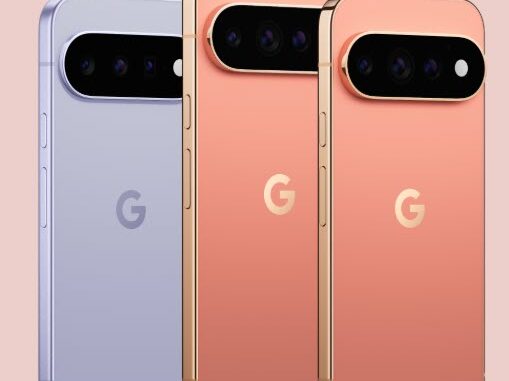
For many years, I was an avid fan of Google’s Pixel phone, which, in my opinion, is the best Android phone on the market. I was reminded why during the past couple of weeks as I’ve been testing Google’s latest offering, the Pixel 11 Pro, the high-end flagship of the Pixel line.
The Pro comes in two sizes, a 6.3-inch model starting at $1,099 and the 6.8-inch Pro XL starting at $1,299. There are trade-in deals and carrier subsidies that can significantly reduce the price of either model.
Like Apple with the iPhone, Google makes both the phone and its operating system, giving Pixel users an uncluttered, pure version of Android and Google apps, along with immediate access to operating system updates. It also avoids much of the bloatware sometimes found on other Android phones, whose manufacturers add their own apps and features to differentiate themselves from the many other Android devices on the market, regardless of whether they actually improve the user experience.
Although I loved my Pixel, I switched to an iPhone in March of last year, not because I preferred Apple’s offering, but for professional reasons. For one thing, my nonprofit, ConnectSafely, was developing content for iOS. I also wanted to be deeply familiar with the phone used by the majority of my readers, as well as most of my friends, colleagues and family members.
Another factor is that nearly all Google apps are available on the iPhone, while very few Apple apps are available on Android. I suppose that’s a point in favor of owning an iPhone, though it also says something about Apple’s reluctance to play nice with other companies’ devices.
I’m writing this review on the day Apple announced its latest iPhones. With the exception of its pricey new folding iPhone Duo, I didn’t see anything dramatically different enough to make me eager to upgrade from my current iPhone. The new Pro models offer faster processors, improved cameras and better battery life, but those strike me mostly as evolutionary improvements, though I’ll withhold judgment on the new iPhones until I’ve had a chance to try them out.
One of the things I like about the Pixel is its on-screen keyboard, which is slightly larger than the keyboard on the comparable iPhone. Both the Pixel 11 Pro and iPhone 17 Pro have 6.3-inch displays, but the Pixel’s keyboard gives me slightly larger keys. It’s simply easier for me to type on, and I find myself making fewer mistakes.
But better than that is a new feature called Rambler, which greatly improves speech-to-text. You tap the little microphone on the keyboard and start talking. Unlike the iPhone, which displays what you’re saying in real time, Rambler stores what you say as you’re speaking. When you’re finished, you tap the check mark and the text appears in your document.
I’m actually using Rambler to dictate this portion of the column into Google Docs on the Pixel. When I’m finished dictating, the text is integrated directly into the same Google Doc I’m using to write this article on my computer, which is pretty amazing.
And it’s not limited to Google Docs. You can use Rambler in Gmail or other apps that use the standard Google keyboard. In my testing, it’s been quite accurate, much more accurate than any speech-to-text system I’ve tried in the past.
Although Apple is beefing up its own AI capabilities, including an updated Siri, Google remains ahead when it comes to integrating AI into the smartphone experience.
Phone makers always brag about the speed of their processors, and I always yawn because it hardly matters in the real world. But Google says its new Tensor G6 is 50% more powerful and uses that power to handle more AI on the device and improve computational photography, which uses software and AI to enhance what the camera captures, including making extreme digital zoom possible.
And when I say extreme, I’m not kidding. As an experiment, I took a picture of a parked car a full block from my house. I couldn’t even see the car’s license plate, let alone read it. But after I snapped a picture at an astounding 50x zoom, the Pixel blurred the image for a few seconds while it processed it, then produced one that clearly showed the car and its license plate. That’s pretty remarkable considering that the camera’s actual optical zoom is only 5x. The rest comes from digital zoom and computational photography.
The Pixel also has a number of other AI features, including the ability to completely alter a picture simply by telling it what you want. I took a picture of myself sitting in my living room wearing a T-shirt and asked it to change my shirt to a Hawaiian shirt and put me in front of the Statue of Liberty. Within seconds, it produced an image of me wearing the Hawaiian shirt and apparently standing in New York Harbor.
One of the most interesting additions is Magic Capture. Rather than forcing you to decide between taking a photograph and shooting video, you activate Magic Capture and press the shutter. The Pixel records video while also picking out individual moments and turning them into still pictures. Google says it works particularly well with children, pets, sports and other action. I didn’t have any kids or pets around when I tried it, so I asked my wife to move around our kitchen, making faces and acting both silly and serious. Magic Capture picked out individual moments, giving me still pictures of her in several different poses and expressions.
The Pro camera system has a 50MP main camera, 48MP ultrawide and 48MP 5x telephoto, along with a 42MP autofocus selfie camera. The Pro phones support up to 120x Pro Zoom.
Google claims more than 30 hours of battery life and charging up to 75% in 30 minutes. I didn’t test the battery life, but other reviewers did and generally found it to be a solid one-day phone, with roughly four to six hours of screen-on time depending on usage. That’s about what I’m getting from my iPhone 17 Pro, which typically gets me through the day without needing a charge.
Gemini is deeply integrated into the Pixel and can do much more than answer questions. It can work across apps and help carry out tasks, such as finding information in Gmail, working with Maps and Calendar or even helping make a restaurant reservation. Tom’s Guide found these AI capabilities to be one of the Pixel 11’s strengths, saying Google continues to lead when it comes to useful AI features.
I’m sure that’s all true, but I’m not yet convinced how useful that level of integration will be for most users. I use AI all the time, but I find it most useful when I’m in control, asking it a question or telling it to perform a specific task, rather than having it automate things on my behalf. That may change over time, or perhaps I’ll adapt, but for now at least, I prefer my AI to do my bidding rather than act on its own.
I’m not ready to give up my iPhone just yet. But the Pixel 11 Pro has me seriously thinking about switching back.
Larry Magid is a tech journalist and internet safety activist. Contact him at larry@larrymagid.com.