This post first appeared in the Mercury News
When I first heard about Google’s new Fitbit Air, I thought I wouldn’t like it, because it doesn’t have a display. But I was wrong. At $99, which is far below the cost of most brand-name wearables, the Air is a capable fitness and health tracker. But its main strength comes from its app, Google Health, which uses AI to provide you with a holistic view of your health and fitness.
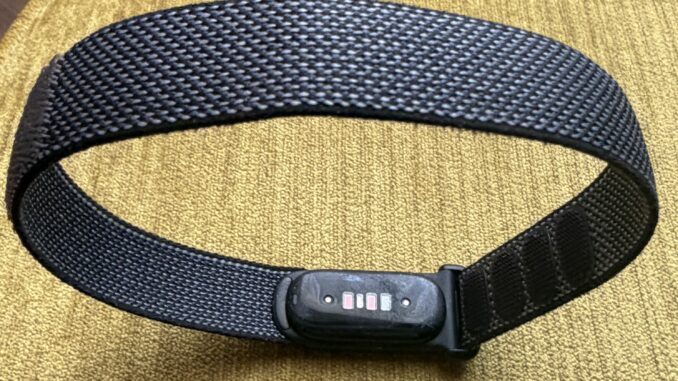
What’s different about the Air compared with most fitness trackers is that it doesn’t have a screen. It’s simply a band you wear around your wrist, with sensors that rest against the top of your wrist. You get its data from either an iOS (Apple) or Android phone.
There are other screenless trackers, including the Woop band and the Oura Ring, which I wear along with an Apple Watch on my non-dominant right hand. But for the past several days, I’ve also been wearing the Fitbit Air on my left wrist.
I’ve also worn four generations of Google Pixel Watches. One thing I like about devices with displays is that you can glance at them at any time to see a variety of information, ranging from your sleep score to your heart rate.
Because the Air has no display, the only way to access your data is through the Google Health app on your phone. And, as it turns out, that’s not nearly as big of an issue as I thought it would be. Most of the health and fitness data I care about doesn’t need to be viewed in real time. When I wake up in the morning, I simply look at my phone to see how well I slept. If I need to know my heart rate, I can easily check it in the app, even during certain exercises such as cycling or using the elliptical.
I have a phone mount on my bicycle handlebars, so I can see my workout metrics and progress as I ride. When I use indoor exercise equipment, I keep my phone in view with the app running. The only time this could be a problem is during activities where looking at a phone would be inconvenient or dangerous, such as running, indoor climbing, or snowboarding. Those are just a few of the more than 40 activities the Fitbit Air can track.
According to Google, the device should automatically recognize when you start a supported exercise, but for me, it worked most of the time but not always. It’s not uncommon for fitness devices to sometimes fail to recognize an exercise. However, you can manually use the app to tell it when you’re starting or stopping an exercise. And there were times when I thought it didn’t automatically recognize an exercise but i later saw it reported in the app.
I’m an avid cyclist, so one of my tests of the Air was to place my phone on its handlebar mount as I rode around town. My phone displayed my distance, speed, elapsed time, and heart rate in large text that was easy to see at a glance. The display depends on the exercise. Although the ones I looked at included heart rate and elapsed time, other parts of the display vary, such as Cardio Load and energy burned (calories) for the elliptical, pace for running, and steps for walking.
I hope Google updates the app to display more cycling data. By comparison, the Apple Watch can show additional metrics such as elevation gain, average speed, calories burned, heart-rate zones, GPS route information and more.
Health metrics
Beyond tracking sleep and activity, the Air monitors a variety of health and wellness metrics. It keeps tabs on heart rate, resting heart rate, heart-rate variability, blood-oxygen saturation (SpO2), and other indicators that can provide insights into fitness, recovery, and overall well-being. The app can alert you to unusual changes and help identify trends over time, giving you a broader picture of your health rather than just a snapshot of a single workout or night’s sleep.
It can also function as a silent alarm, waking you with gentle vibrations on your wrist instead of a loud sound that might disturb others. Its Smart Wake feature is designed to wake you during a lighter stage of sleep.
Connecting to health providers
The Google Health app allows you to import data from a wide range of health providers. I loaded mine and received an AI-generated report based on 17 years of health data, including recent blood tests and scans. The report analyzed that information alongside fitness and health data recorded by the Fitbit Air band.
Taken together, the analysis was highly useful. It provided a holistic overview of my health and offered insights into the conditions I’m managing.
Subscription optional
The Air works with or without a Google Premium subscription. Without a subscription, you get basic data including 24/7 heart-rate monitoring, step counting, automated exercise tracking, Cardio Load, Daily Readiness scores, SpO2 (blood oxygen) tracking, irregular heart rhythm notifications, and baseline sleep-stage analysis. Upgrading to Google Health Premium, which costs $9.99 monthly or $99 annually, adds a conversational, Gemini-powered Google Health Coach to analyze biometric trends alongside user lifestyle inputs, as well as long-term sleep profiling, a library of guided workouts and mindfulness content, and exportable health reports intended for medical professionals.
Good use of AI
I have the premium subscription, and what impressed me most were the reports I received each morning. I didn’t sleep well the first two nights I used the Air, and my morning scores reflected that. But on the third night, I followed its advice and got to bed on time. After what felt like a restful night’s sleep, I woke up to a report noting that my readiness and sleep scores had rebounded. It highlighted that I had slept nearly eight hours, pointed out that my heart-rate variability was above my monthly average, and even factored in the local weather before suggesting it might be a good day for a bike ride. It also noted that I woke up a few times during the night and offered suggestions on how to reduce those middle-of-the-night awakenings.
Because it is linked to my health information, the advice was tailored accordingly. While I wouldn’t rely on such advice uncritically, it demonstrated how AI can turn health data into understandable insights and recommendations.
The more I wore the Air, the more insightful its analysis became. Thanks to AI, the insights I’m getting from the Air go far beyond anything I’ve ever received from a smartwatch or fitness tracker.
7-day battery life
Unlike most brand-name smartwatches with displays, which typically require recharging every day or two, the Air can operate for up to seven days on a single charge. This week-long battery life is comparable to that of other screenless wearables, such as the Oura Ring. The device also supports fast charging, with a five-minute charge providing up to a full day of battery life.
The Air comes with a proprietary charger. I normally buy an extra charger for my travel bag, but I’m holding off spending $25 for a second Air charger because most of my trips are shorter than seven days.
Trackers are not for everyone
I know people who have abandoned their fitness trackers because they feel they don’t need to be reminded when they didn’t sleep well or “rewarded” with flattering commentary every time they did right by themselves. I get it. Not everyone needs to be inundated with data, especially those who get stressed out when they get reports from their devices that they’re suffering from too much stress.
But what I like about the Fitbit Air is that its reports are not in your face. You can ignore them or choose to look at them on your phone. And, of course, it’s up to you whether to make any changes based on what your device recommends.
Disclosure: Larry Magid is CEO of ConnectSafely.org, a nonprofit internet safety organization that receives financial support from Google.